Mechanical vs. Membrane Keyboards: Which is Best for Gaming & Typing?
When buying a new keyboard, the biggest choice you will face is deciding between mechanical and membrane switches. Keyboards are our primary interface with computers, and the type of switch you choose has a massive impact on your comfort, typing speed, gaming performance, and long-term joint health. This article explores the core differences, pros, and cons of both styles to help you make an informed decision.
1. How Membrane Keyboards Work
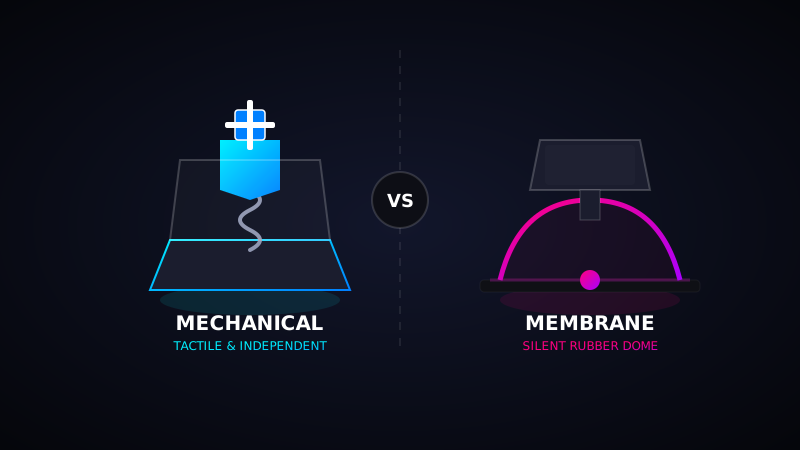
Membrane keyboards are the most common type found in budget setups, standard laptops, and offices. They operate using three flexible layers (membranes) with conductive traces. Pushing a key down collapses a rubber dome, pushing the conductive points together to complete the circuit and register the keypress.
- Feel: Soft, quiet, and "mushy" because of the rubber dome resistance.
- Actuation: You must "bottom out" the key (push it all the way down) to register the letter.
- Lifespan: Around 5 to 10 million keystrokes before the rubber dome degrades.
2. How Mechanical Keyboards Work
Mechanical keyboards feature an independent physical switch under every single key cap. Inside each switch is a plastic stem, a metal spring, and metal contacts. When a key is pressed, the stem slides down, allowing the metal contact leaves to touch and register the keystroke.
- Feel: Crisp, tactile, and highly responsive. Switches are color-coded (Red for linear, Blue for clicky, Brown for tactile) to offer customized feedback.
- Actuation: Keys actuate halfway down, meaning you don't have to push them completely down, reducing finger fatigue.
- Lifespan: 50 to 100 million keystrokes, lasting up to 10 times longer than membrane keyboards.
Test Keyboard Rollover & Latency
Are you using a mechanical keyboard? Test its N-Key Rollover (NKRO) and check if it supports simultaneous key registrations on our diagnostic tool.
Start NKRO Test3. Key Rollover (NKRO) Comparison
One critical difference for gamers is Key Rollover (how many keys can be pressed at once). Most membrane keyboards support only 2-key or 6-key rollover due to their shared conductive matrix sheet, which causes "ghosting" (missed keystrokes). Mechanical keyboards feature independent switches, allowing 100% N-Key Rollover (NKRO) where you can press all keys simultaneously, and every single one will register instantly.
Pros and Cons at a Glance
- Membrane Pros: Very affordable, quiet typing sound, and lightweight.
- Membrane Cons: Mushy typing feel, shorter life, harder to clean, and prone to key ghosting.
- Mechanical Pros: Incredible tactile typing experience, very long lifespan, high-speed gaming NKRO, and fully customizable.
- Mechanical Cons: Expensive, loud clicky sound (can be noisy in offices), and heavier build.
Conclusion: Which Should You Buy?
If you type for hours, write code, or play fast-paced competitive games, a mechanical keyboard is easily worth the extra cost. It reduces fatigue, improves speed, and provides a satisfying tactile feedback. However, if you are on a tight budget or work in a quiet office environment where keyboard noise would disturb others, a high-quality membrane keyboard remains a practical and functional choice.