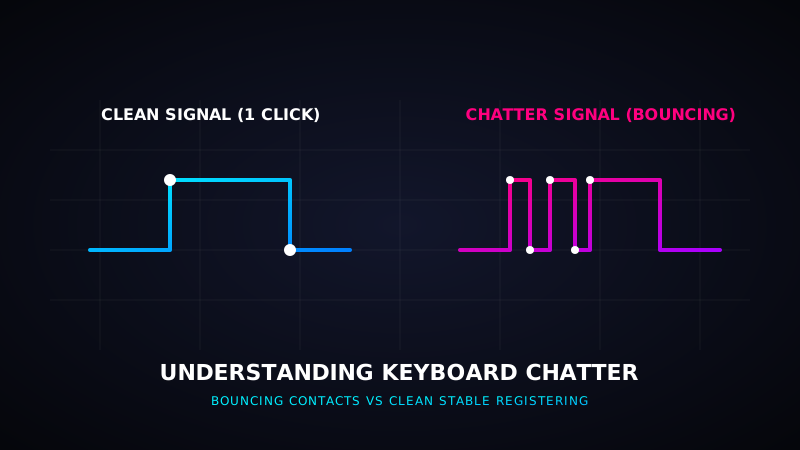
What is Keyboard Chatter and How to Fix Bouncing Keys
Have you ever typed a word and noticed double letters (e.g., typing "hello" and seeing "hellloo")? If so, your keyboard is suffering from a hardware issue known as **keyboard chatter**, also referred to as **key contact bounce**. It is one of the most frustrating problems that mechanical keyboard owners face, but it is highly fixable. This article explains the science behind keyboard chatter and how to resolve it using software filters and hardware cleaning.
1. The Science: Why Do Keys Bounce?
Inside every mechanical keyboard switch are two small copper leaves. When you press a key down, the stem forces these metal leaves to touch, completing the electrical circuit and sending a keypress signal to the computer. However, because metal is elastic, these copper contact points vibrate or bounce rapidly when they collide. Instead of a single clean connection, they make contact multiple times in a microsecond.
Usually, a keyboard's internal controller has a built-in timer called **de-bounce delay** (usually 5ms to 15ms) that filters out these extra bounces. However, as switches get dirty, oxidized, or worn down, the bouncing lasts longer than the de-bounce window, causing your operating system to register multiple inputs from a single physical click.
2. Common Causes of Switch Chatter
- Dust & Debris: Tiny dust particles lodge between the copper leaves, causing inconsistent electric connections that mimic bouncing.
- Oxidation: Humid air creates an oxide layer on the copper contacts, interfering with the current flow.
- Mechanical Fatigue: After millions of keystrokes, the switch spring loses tension, causing the contact plates to bounce longer.
Check Your Key Registrations
Think your keyboard is chattering? Run our interactive diagnostic test to check if your keypresses register multiple signals.
Start Chatter Test3. Software Fixes: Keyboard Chatter Blockers
If you have soldered mechanical switches and cannot easily replace the faulty switch, software is the easiest solution. Software fixes monitor the typing speed of each key. Since humans cannot physically click a key twice in under 30 milliseconds, the software will automatically block any repeat keystroke that occurs within a short window (e.g., under 40ms).
Popular free tools include:
- Keyboard Chatter Blocker (Windows): An open-source application that lets you configure threshold delays per key and logs blocked chatters in real-time.
- Unchatter (Mac/Windows): A lightweight utility designed to suppress bouncing key inputs seamlessly.
4. Hardware Fixes: Cleaning the Switch Contacts
If you want to solve the problem permanently at the hardware level, try these steps:
- Compressed Air: Remove the keycap, hold down the switch stem, and blow compressed air directly into the switch housing gaps to clear out dust.
- Isopropyl Alcohol (99%): Drip 2-3 drops of high-purity isopropyl alcohol directly into the switch stem. Press the stem rapidly 30-40 times to allow the alcohol to dissolve dirt and oxidation on the copper contact leaves. Let it dry for 15 minutes before plugging it back in.
- Solder a New Switch: If the switch is physically worn out, you will need to desolder the faulty switch and solder in a fresh one.